



What Are SMR Drives and How They Differ from Traditional HDDs
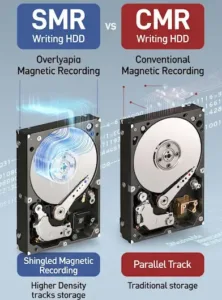
SMR (Shingled Magnetic Recording) hard drives are increasingly used in recent years, especially in high-capacity models. Although they look identical to traditional HDDs on the outside, internally they operate in a fundamentally different way — with serious implications for performance and data recovery.
SMR vs CMR: the fundamental difference
In traditional CMR (Conventional Magnetic Recording) drives, each track is written independently and can be modified on its own. If a single sector changes, only that sector is rewritten.
In SMR drives, tracks overlap each other like roof shingles. This allows higher data density, but introduces a key limitation: a single track cannot be modified without affecting the tracks that follow it.
Why SMR drives are slower during writes
When an SMR drive needs to modify a small portion of data, it must:
- read the original track,
- read all subsequent overlapping tracks,
- rewrite them all from scratch.
This is why SMR drives:
- show significant delays during write operations,
- exhibit performance spikes,
- behave unpredictably in RAID or server environments.
What happens during deletion or formatting
On an SMR drive, file deletion does not mean immediate data removal, and a quick format usually only alters the filesystem structure.
The actual data often remains stored in previous physical locations until the drive internally cleans it at a later time.
Why this matters for data recovery
Due to the way SMR drives operate:
- there may be multiple physical versions of the same data,
- data may not reside where the filesystem indicates,
- simple recovery tools may present a misleading picture.
Understanding what truly exists on the disk requires knowledge of internal translation mechanisms, especially the T2 Translator, which is covered in the next article.
Next: How the T2 Translator Works in WD SMR Drives
WD SMR drive? Don’t make the common mistake.
If your drive is a WD SMR and you have lost access to data (deletion, format, RAW partition, unreadable files), do not run recovery tools blindly.
On SMR drives, every additional scan or write operation can trigger internal cleanup mechanisms (background operations / TRIM) that dramatically reduce recovery chances.
- Stop using the drive immediately.
- Do not run format, chkdsk, or “repair” tools.
- Avoid raw scans unless you fully understand what is being read.
At Northwind Data Recovery, we regularly handle WD SMR cases using physical-level analysis and controlled access methods designed to preserve recoverable data.
Request a case evaluation
|
Drive shipping instructions
Tip: If possible, note the exact drive model (e.g. WDxx…) and what happened (deletion, format, power loss, drop). This helps us quickly assess what is realistic.